☀️ Coming soon to the Chrome Web Store

Your history,
quietly spotless.

Sunda Spotless is a friendly little Chrome extension that clears adult pages out of your browser history — on its own, the moment they turn up. No lists to keep, no “clear browsing data” to remember at midnight, no incognito windows to live in. It all happens on your own computer, and nothing about the pages you visit is ever sent anywhere.

Nothing you browse ever leaves your computer · No account · No tracking

See the sweep in action

Watch a morning's history tidy itself.

Here's an ordinary morning of browsing. Sunda looks at each page as it arrives, makes up its mind, and moves on. Two entries slip quietly away. The other four — including a sexual-health page and a news story — stay exactly where they are, because being about sex is not the same thing as being porn.

  • 09:14 Council approves the new tram line citynews.example
  • 09:37 Adult video gallery — page 3 adult-site.example
  • 10:02 Contraception: what to expect at your appointment sexualhealthclinic.example
  • 10:21 One-pot lemon chicken with orzo recipes.example
  • 10:48 Explicit photo gallery — members area explicit-tube.example
  • 11:07 Match report: City 2–1 Rovers sportsdesk.example

Out of these six pages, two are swept out of the history — the adult video gallery at 09:37 and the explicit photo gallery at 10:48. The other four are kept: the news story, the sexual-health clinic page, the recipe and the match report.

The clinic page is the whole point. Sunda doesn't just ask “is this adult?” — it asks the honest alternatives too: is this a news report, a health page, a lesson, an encyclopedia article? A page only goes when the adult answer clearly beats every one of them. That's how a contraception leaflet, a sex-education class and a news story about the porn industry all stay put.

How Sunda does it

Three little steps, all on your computer.

No account, no cloud, no peeking. Sunda thinks about each page right there in your browser — and then gets out of the way.

Sunda takes a peek

When a page opens, Sunda reads its address, its title and a little of its wording — nothing more, and never a picture of your screen. That peek stays on your computer and is forgotten when you close your browser.

Sunda weighs it up

Then it asks the fair question: does “adult content” explain this page better than news, shopping, technology, reference, health, sport, entertainment or education would? Only a clear win counts. A close call is left alone.

The entry slips away

If adult wins, that one history entry is deleted — quietly, straight away, with no banner and no fuss. Nothing else in your history is touched, and you never had to remember a thing.

The guided tour

The whole thing fits in one panel.

There is no settings page to go and find — the little popup is the entire extension. Seven screenshots, straight from the real thing, and you'll have seen all of it:

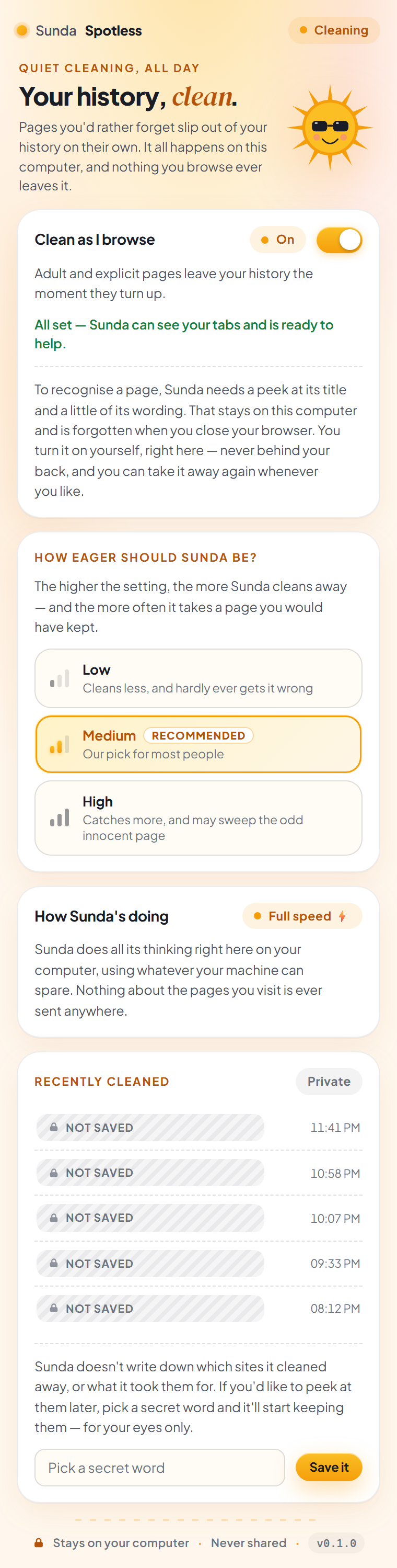
The full Sunda Spotless popup: a status pill at the top, Sunda the sun above the words Your history, clean, a Clean as I browse card switched on, a How eager should Sunda be card set to Medium, a How Sunda's doing card, and a Recently cleaned list marked Private.

Meet your sunny sidekick

Pin Sunda next to your address bar and pop it open. Everything lives in this one cheerful panel: the switch, the eagerness dial, how Sunda's getting on, and the list of what it has cleaned. That's the whole product — there is no options page hiding somewhere with the real settings in it.

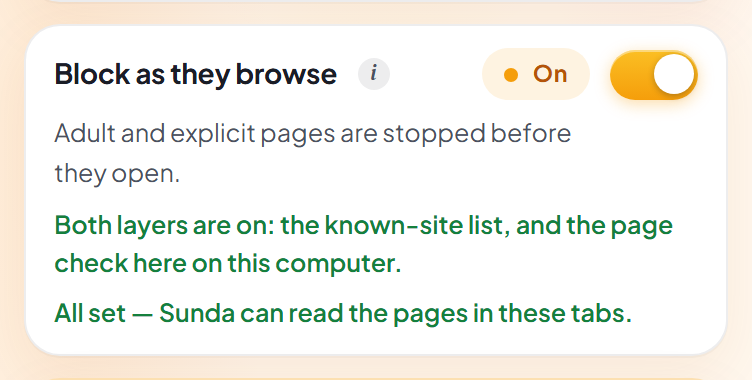
The Clean as I browse card: a switch turned on, a note that adult and explicit pages leave your history the moment they turn up, and an explanation that Sunda needs a peek at each page's title and a little of its wording, which stays on this computer.

One switch, and it's the whole job

This is the only on-off there is. Flip it on and Sunda cleans as you browse; flip it off and everything stops — the little sun literally curls up and falls asleep. The first time you turn it on, Sunda asks for permission to look at your pages with a button reading “Let Sunda take a look”, and Chrome puts its own question in front of you. Until you say yes, Sunda does nothing at all.

The whole popup with cleaning switched off: the pill at the top reads Taking a break, the Clean as I browse card shows Off with its switch swung to the left, and Sunda the sun is dozing under a little stack of z's.

And this is what “off” looks like

Flip it the other way and the whole panel follows you: the pill at the top reads Taking a break, the card itself says Off, and Sunda curls up for a nap with a little stack of z's. Nothing is read and nothing is cleaned until you flip it back — and everything you'd already chosen is still sitting there waiting for you when you do.

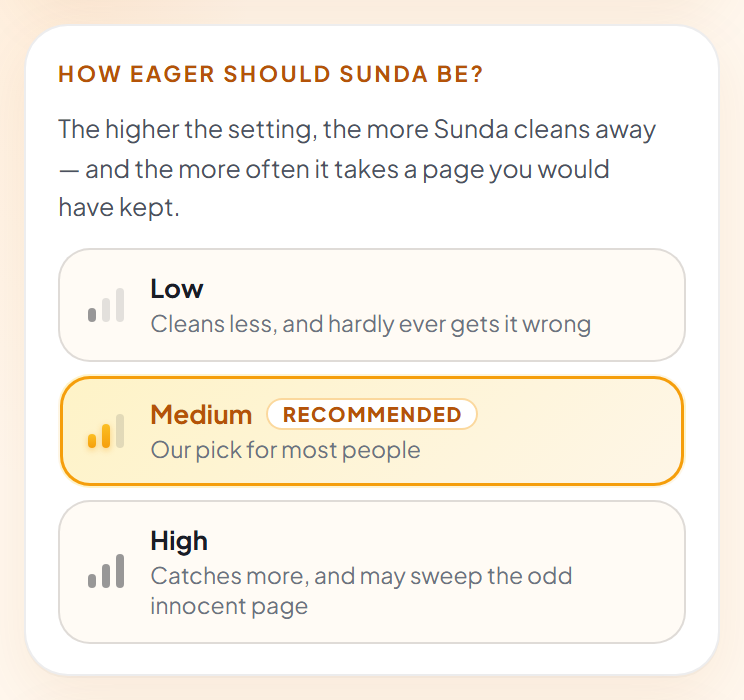
The How eager should Sunda be card: three choices side by side — Low, cleans less and hardly ever gets it wrong; Medium, marked Recommended, our pick for most people; and High, catches more and may sweep the odd innocent page.

The only dial on the dashboard

Three settings, in plain English. Low cleans less and hardly ever gets it wrong. Medium is our pick for most people, and where Sunda starts. High catches more, and may sweep the odd innocent page. No numbers, no percentages, nothing to look up — just pick the one that sounds like you.

The How Sunda's doing card: a pill showing the running mode, and a note that Sunda does all its thinking right here on your computer and that nothing about the pages you visit is ever sent anywhere.

See how it's getting on

A little pill tells you how Sunda is running — Full speed if your computer lends it the graphics card, Steady if it's doing the thinking the ordinary way, and Simple mode if it's falling back on its plain checklist. The very first time, it fetches its brain once and shows you a progress bar. After that, nothing is downloaded again.

The Recently cleaned list while locked: each row is an identical hatched bar with only a time beside it, and a box asking for your secret word.

A list that says nothing

By default Sunda writes nothing down but the time. Not the site, not what it was judged to be, and never the full address — so there's simply nothing there to be discovered. Each row is the same hatched bar as every other, which means even a long stack of them gives away nothing, not even how long the names behind them were.

The Recently cleaned list after unlocking with the secret word: the rows now show site names beside their times, with buttons to hide the list again or to forget and clear it.

Or a list only you can read

Would you rather be able to check? Choose a secret word and each entry gets sealed as it's written. Type the word in the popup and the names appear; close the popup and they lock themselves again. The word never leaves your computer and is never saved anywhere — forget it and even Sunda can't read the list back. One button wipes the lot whenever you like.

Everyday wins

For the small moments you'd rather not explain.

None of this is a scandal. It's just that a browser remembers everything, forever, and hands it to whoever opens it next. Sunda's whole job is to make that stop being a thing you have to think about.

The family computer

One machine, several people, one history. Sunda keeps the grown-up corners of your browsing from turning up while someone's looking for last night's recipe.

“Can I borrow your laptop?”

Of course you can. Handing over your browser stops being a small act of courage when there's nothing waiting in the history to be stumbled into.

Sharing your screen

A call, a class, a colleague leaning over. Opening a new tab in front of an audience shouldn't feel like a gamble — and with Sunda around, it doesn't.

Nothing to remember

No clearing your history at 1am, no wondering whether you did. Sunda handles it as it happens, so the thought never has to cross your mind again.

A private moment, kept private

Without living in incognito for everything else. Keep your logins, your saved tabs and your ordinary history — Sunda only tidies the one corner.

An address bar that behaves

The entry is gone, so autocomplete has nothing to helpfully suggest. Type two letters in front of anyone you like.

What's under the sunglasses

Small extension. Very tidy sun.

Under the friendly exterior, Sunda has exactly one job and a stubborn set of rules about how to do it. Here's the tour, jargon-free.

A brain that lives on your computer

The judging happens inside your own browser, using your machine's own power. Sunda fetches its brain once, the first time, and then never asks the internet for anything again.

It weighs the honest alternatives

Every page is judged against eight ordinary explanations — news, shopping, technology, reference, health, sport, entertainment, education. Adult only wins when it clearly beats all of them, which is how the clinic page and the news report keep their place.

One switch, and that's the settings

There's no category list to wade through and no options page to hunt down. The switch is the whole thing: on, and Sunda cleans; off, and it dozes off with a little stack of z's.

An eagerness dial, in words

Low, Medium or High — cleans less and hardly ever gets it wrong, our pick for most people, or catches more and may sweep the odd innocent page. Nobody should have to type a number to be comfortable.

A list sealed with your word

By default the list holds nothing but times. Add a secret word and each entry is sealed as it's written — readable only in the popup, only after you've typed the word, and never saved or sent anywhere.

Nothing of yours leaves home

No account, no sign-up, no telemetry, no usage stats. Nothing about the pages you visit is ever sent anywhere — the one and only request Sunda ever makes is for its own brain, once.

What it leaves alone

The pages Sunda quietly spares.

Sexual health kept News reporting kept Sex education kept Encyclopedias & reference kept Shopping kept Technology kept Sport kept Film, TV & entertainment kept Adult & explicit swept

Only one kind of page is ever swept away, and even then only when “adult content” explains the page better than every honest alternative above — clearly better, not by a whisker. A page with almost nothing on it, like a bare login screen, is never handed to Sunda's brain at all — we'd rather it didn't guess from nothing. On a page like that, the only thing that can still apply is the short, hand-checked list of addresses that are unmistakably explicit. And Sunda only ever looks at ordinary web pages: files on your own computer, Chrome's own settings and extension pages are off-limits by design.

Sunda's sunny promises

Private by construction, not by promise.

It would be a very odd tool that protected your privacy by collecting your browsing. So these aren't pinky promises in a policy — they're simply how Sunda is built.

Nothing you browse is ever sent

The pages, their titles, their wording, the verdicts — all of it stays on your computer, and the peek Sunda takes is forgotten when you close your browser. Sunda has no server of its own. The only request it ever makes to the internet is for its own brain, once, and a fully bundled build makes even that zero.

Nobody's watching

No account, no sign-up, no analytics, no telemetry, no usage stats. Sunda never phones home about you — it wouldn't even know what to say. Even we can't peek, and that's exactly how we like it.

The list is sealed, and the word is yours

Leave it as it comes and there's nothing on disk but timestamps. Choose a secret word and every entry is sealed the moment it's written; the word is never saved anywhere, so a wrong guess simply doesn't open it, and a forgotten one closes the list for good — us included.

Nothing happens without your say-so

Sunda can't look at a single page until you press “Let Sunda take a look” and Chrome asks you itself. That's why installing it carries no scary “read all your sites” warning — until you say yes, the extension is completely inert. Take the permission away again and everything stops on the spot.

☀️ Coming soon to the Chrome Web Store

Let the little sun tidy up.

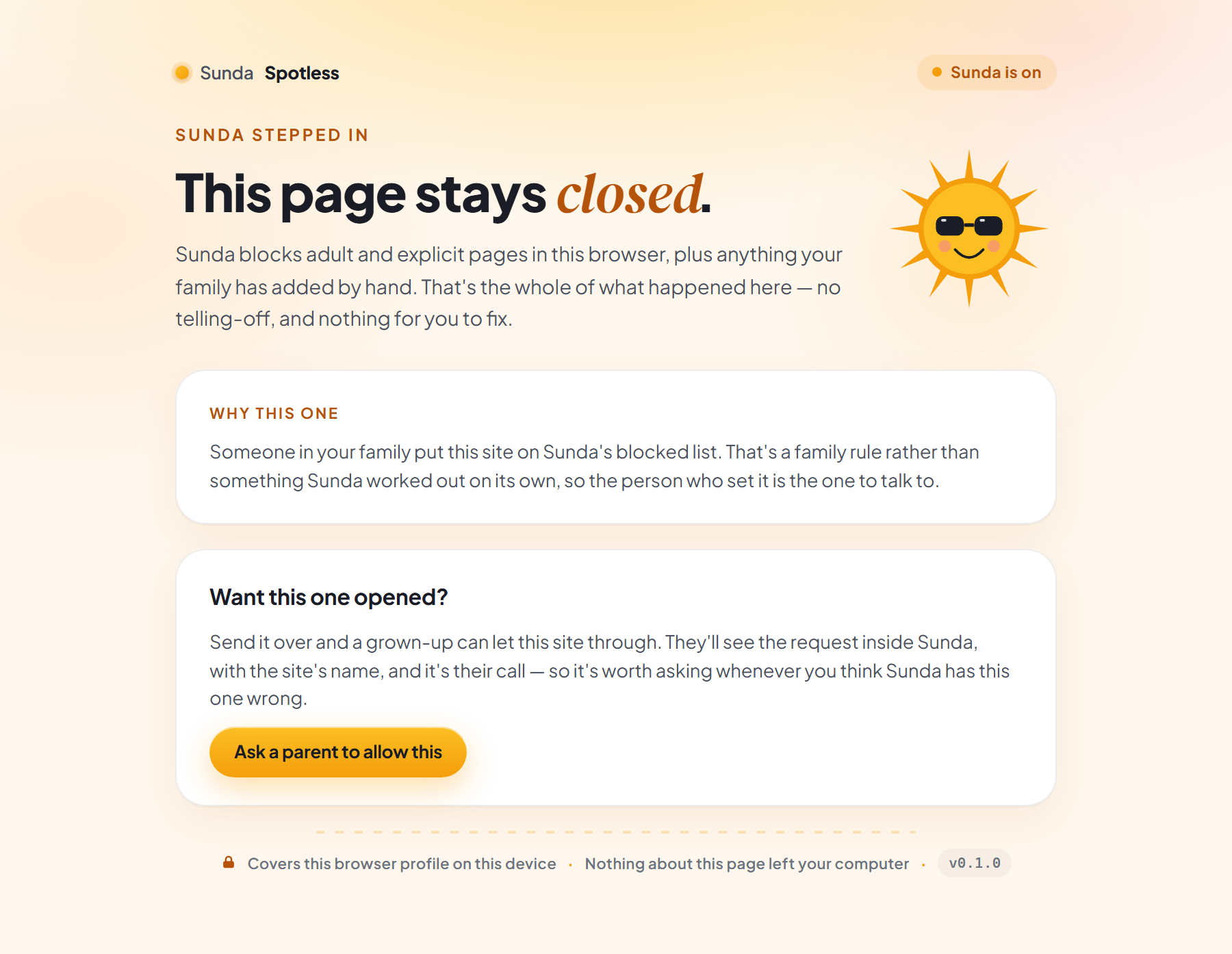
Sunda Spotless isn't out quite yet — the little sun is still polishing its sunglasses. When it lands it'll be free to add: no account, no sign-up, nothing to pay for. Everything on this page already works exactly as described — the screenshots above came straight from it.

No waitlist and no email capture — asking for your address would be a funny look for a privacy tool. Just check back soon. (You'll need Chrome 116 or newer, which you almost certainly already have.) ☀️